Showing posts with label facebook. Show all posts

Thursday, January 14, 2010

Easy Wins


After you read this make sure that you are on your computer and implementing some of the suggestions below. There are many free and affordable options on the world-wide-web today to get your business listed and be seen by web surfers. These easy wins will help you to get going for 2010.

LinkedIn
If not already, go ahead and register yourself for a LinkedIn account. After establishing an account, you can now start a LinkedIn company profile. You can select MORE on the header to add a company.

Facebook
Like LinkedIn, if don’t already have a Facebook account, establish one now. A Fan page for your business must be linked to a personal page, so without a personal account, you will not be able to initiate a Fan page.

Google Business
You can register your business on Google and be listed with a location and map. You have probably seen it, sometimes when you search for a business, Google also provides you the physical location of the business, along with a phone number and website. Follow this link to get started on listing your business.

Yelp
Yelp probably one of the more popular listing sites on the internet. Along with being able to list your business, Yelp also has the capability of providing its visitors a means to leave feedback or reviews. Akin to Yellowpages, Yelp is very powerful and helps your business to get that added visibility.

Friday, November 13, 2009

Facebook for Businesses: A Beginner's Guide Part II

Upon reading this post, hopefully you will have had a chance to set-up your Facebook Fan Page for your business and have been navigating it to learn its functionality. By now, you may have a few fans, if not, go and invite your friends to become fans of your new page. In this guide, I will go over the elements that can optimize your existing Fan Page.

Wall Page
Let's begin by looking at your Wall page. This is where you and your fans can interact. This is a neat feature in that you have the ability to update your fans without spamming them. They can view your wall at their convenience. Consumers can now choose when they want to engage, and this is the beauty of social media, like Facebook. With that in mind, you will need to keep your Status Updates interesting to ensure your fans have a reason to keep coming back. In your updates, you can insert Links, Photos, Videos, Events, etc.When you are ready to share, simply click on the "Share" button to publish. This will now show on your all your fans wall.

Customized Link
When you initially establish your Fan Page, Facebook assigns you a fairly complicated URL that you often can't use for distribution unless you create a hyperlink. However, once your Fan Page achieves 25 fans, you can apply for a customized link at facebook.com/username. After completing this I was able to get facebook.com/apogeemarketing, much more simple.

Landing Page for Non-Fans
When visitors that are not yet fans of your Facebook Page, they will land on your Wall page, which is not the best welcome page for someone who knows nothing about your business or product. It's probably more appropriate to have them land on your Info page or another page that you create from FBML (we will talk about this another time as you will need some coding experience to get this going). But for our purposes here, we will have them land on the Info page. You can achieve this by selecting Edit Page and go to the Wall settings to edit. Now you can select the landing page for everyone who is not a fan. In doing this, you are now giving visitors a chance to learn about who you are.


Applications

Facebook is great in that it has many applications that you can add to make your Facebook more dynamic for your fans. If you have a Twitter account (if you don't, you should), you can link your Twitter account to your Facebook Fan Page. You can selectively tweet to your Facebook page by ending your tweets with the hashtag #fb. That simple...this way you don't flood your Facebook fans with non-relevant tweets that may not apply. Just go to Selective Twitter Status to add this application to your page.

Do you have a blog? Well, now you can include your new posts to your Facebook Page. This is automatic, so anytime you post it is included in your Wall. Be patient, it is not instant. If you don't see it immediately because it will take time. Go to Networked Blogs to add the application.

Did you find this useful? Well, be on the lookout for our Screencasts of tutorials to help get you going on all your marketing.

Monday, October 26, 2009

Facebook for Businesses: A Beginner's Guide Part I

I have recently been speaking with a few small businesses and it has become apparent that Facebook and Twitter are not easy to set up for those who have spent minimal time interfacing with them. I figured that a quick overview of the basics is necessary before even talking about how to optimize it.

Set-up, like anything else new, can be somewhat daunting, especially if the environment is unfamiliar. However, after a few times navigating Facebook or Twitter, it becomes really easy. We will start this series with Facebook Page set-up for your business. If you don’t have a Profile account already with Facebook, we will need to begin with this first. Keep in mind that your Facebook profile may not be used as a page for your business, this is against Facebook's Terms of Use. However, your Fan Page will be connected to your personal profile.

Once you arrive at the Facebook homepage, set-up your account with your personal information as shown below.


Once you have been provided access to your profile homepage, now you can generate your business page. If you scroll to the bottom of your homepage, you will see an “Advertise” link.


After clicking the link, the first thing you will see is create an ad link. You don't want this, click the “Page” tab (now we are talking business…no pun intended). The following page will appear and you will need to select create a new page. You will now have to define your business or product with the appropriate options. What you select on this page will determine some of the functionality of your business page. For example, if you have a storefront, you will have the capability of entering store hours in the “Info” section of your Fan Page.

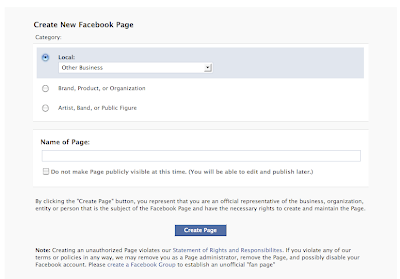
One thing to note is that you don’t have to finish all of this in one sitting. You will have the opportunity to select, do not publish, which is what you want so that you don’t publish once you finish. In most cases, prior to publishing you will want to become comfortable with the functionality of the page.

Select the “Info” tab on your homepage and click on Edit. This will give you the opportunity to give some background information on your company, products, and services. This is a good area to have links to your website, blog, Twitter, etc.


Now for the fun parts…customizing your Fan Page! You can upload your company logo on the upper left screen. Select that area and you will be able to upload your logo. When you complete this step, go back to your homepage and enjoy your customized fan page.

Just below your logo, is an area where you can write a brief description of what your business offers. This is a critical area as Google searches this space for key words and determines your ranking. Complete this and voila! Your very own Facebook Fan page for your business. But before you celebrate, go ahead and publish for the world to see.

Congratulations, now you can start writing on your wall and inviting your friends to become fans! We will have an advanced post with more information to optimize content and add additional features to your web page. In the meanwhile, enjoy your Fan Page and begin engaging with your target market.

Sunday, October 4, 2009

Writer's Wanted

We are looking for contributors both for Apogee Marketing Partners. We are seeking marketing professionals who are able to write about relevant marketing topics today that can have an impact on how our members drive their marketing initiatives.

If you or anyone you know is interested or have any questions please feel free to contact us directly on our Facebook page, and send us a message.
Otherwise, here are some basic guidelines:
  1. Article being submitted must be original and written by the applying author. It must not have been published previously.
  2. Articles will not be an advertising for a service, product or company that you have any affiliation.
  3. Topic must be current and relevant to the marketing industry.
  4. Author will retain copyrights to the article. Apogee Marketing Partners will have rights to produce reprints or use of article in our website.
  5. Materials can be in the form of a case-study, know-how guide, a novel marketing template or tool.
  6. Topic is not limited to any one element of marketing, we are looking for writer's who can write about product innovation as well as value pricing.
  7. We reserve the right on where your article will be featured (eg newsletter, news, case-study, etc.)
  8. If we like your work, you may be invited to be a regular contributor. Compensation for each article will be reviewed on a case by case basis.
What are you waiting for? Contact us and let your voice be heard.

Friday, September 25, 2009

Apogee Marketing Partners Launch

Are you a small to medium sized business? Looking to add marketing to your business or to complement your existing team with affordable professional marketing resources? Stay tuned...Apogee Marketing Partners will change how you approach marketing. Meanwhile, feel free to follow us on Facebook or Twitter for the latest updates.